> For the complete documentation index, see [llms.txt](https://docs.spydra.app/llms.txt). Markdown versions of documentation pages are available by appending `.md` to page URLs; this page is available as [Markdown](https://docs.spydra.app/products-overview/private-network/block-explorer.md).
# Block Explorer
Block explorer is a tool used to view and navigate through the contents of a blockchain. Block explorer provides valuable insights into the transactions, addresses, and overall state of the blockchain network.
Use Spydra's block explorer feature to:
1. View Transactions: Explore and search for specific transactions by its hash. You can examine transaction details and owner details.
2. View Blocks: Explore and search for specific block by a block's number. You can examine number of transaction in the block and other details.
3. Monitor Network Stats: Keep track of network statistics, including the total number of transactions, the block height, and the overall health and performance of the blockchain network.
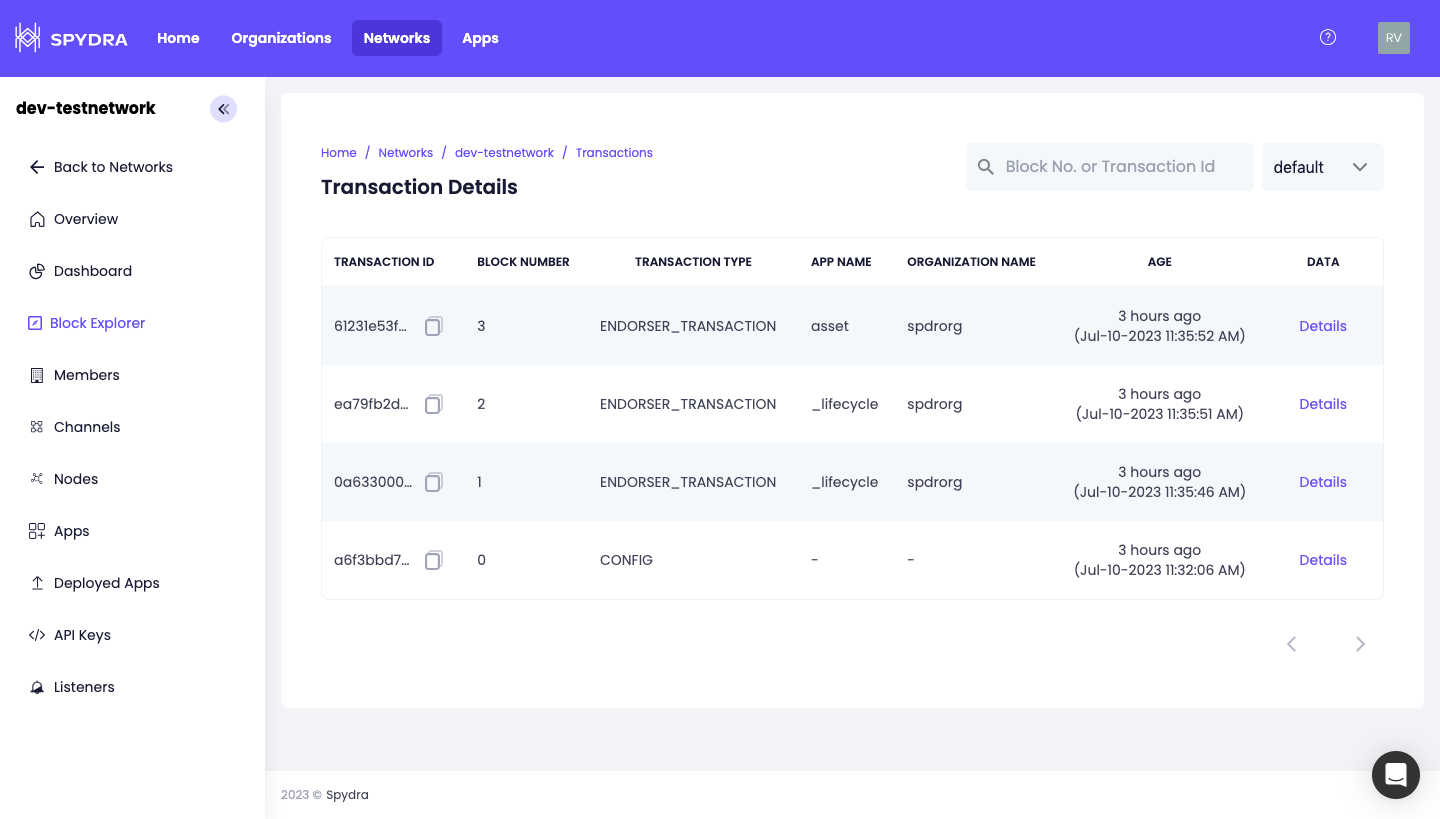
To explore block explorer-
* Open any active network details.
* Click 'Block Explorer' option on the left menu
* You will see a tabular data with following column information
* Transaction ID
* Block number- if a block has 10 transactions, 10 rows with the same block number will be displayed.
* Transaction type-
* CONFIG Transaction:\
Represents a transaction used to make changes to the network's protocol or rules. These can include various settings like block size, transaction fees, consensus rules, or other network-specific configurations.
* CONFIG\_UPDATE Transaction:\
Represents a transaction which is typically initiated by a network participant, such as validator or administrator, who wish to propose modifications to the network's configuration settings.
* ENDORSER\_TRANSACTION:\
Represents a transaction that has been endorsed by the required endorsers, indicating that the transaction has gone through the endorsement process and is ready for further processing, validation, and inclusion in a block
* Organisation- which added the transaction
* Application name
* Age of the block
* Search for a transaction using a transaction ID or search for a block using block number
* Click 'Details' to view detailed JSON of each transaction